Troubleshooting
Troubleshooting
- Save scanned image:
- To save with RAM, click here
- To save with FTP, click here
- Set IN terminal, OUT terminal:
- For IN terminal, click here
- For OUT terminal, click here
- Connect PLC with Ethernet→click here
- Output data with RS-232C→click here
- View the scan image in real time→click here
- Click here for input setting to the scanner.
- Click here for output setting from the scanner.
- Click here for communication setting with the scanner.
The LED on the side of the scanner is blinking high rate of 5 times per second.
| Blinking LED | Detail |
|---|---|
TUNE LED (yellow) |
The scanner is powered on . |
AIM LED (red) |
One or more serious problems as the following have occurred related to scanning function. |
| 1. Industrial protcol communication error →Click here for the solution. | |
| 2. Scanner temperature error →Click here for the solution. | |
| 3. Set to connect with DHCP and failed to acquire the address. → Check the connection to the DHCP server. |
The web server response is slow
If it is loading, it is not abnormal.
The read process is prioritized and the Web server process slows down during the read process.
Forgot the Ethernet communication settings and cannot communicate
Use the UnicersalTuningTool to search the scanner, and check/change the settings.
Forgot the user name and password of Web security, cannot display the setting window.
As described below, perform initialization by the key operations.
After resetting, all settings will be factory settings.
Use UniversalTuningToo and set from the beginning.
Cannot communicate with RS-232C
Communication settings
Confirm that communication settings match the host device.
Wiring
Confirm that the wiring is connected correctly.
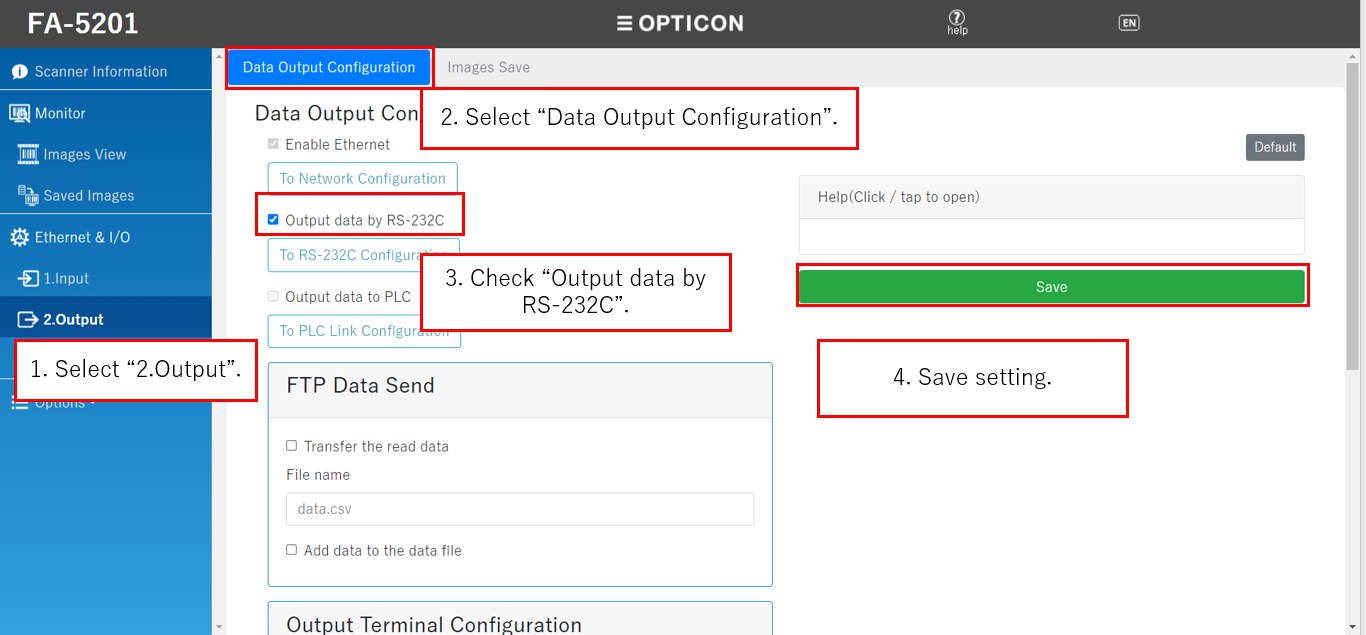
RS-232C does not output scan data
RS-232C transfer is slow when scanning large data and if the internal buffer becomes full, the next scanning may fail.
Therefore, the scan data is not output to RS-232C by default.
To send scan data, check "Output data with RS-232C" in the Data output setting and save.
Initialize by key operation
Press Mode key and Trigger key at the same time for 5 seconds. The scanner becomes initialize standby state and all 3 LED blinks.
In that state, press the trigger key to initialize. To cancel initialize standby state, press the mode key.