Images View
Images View
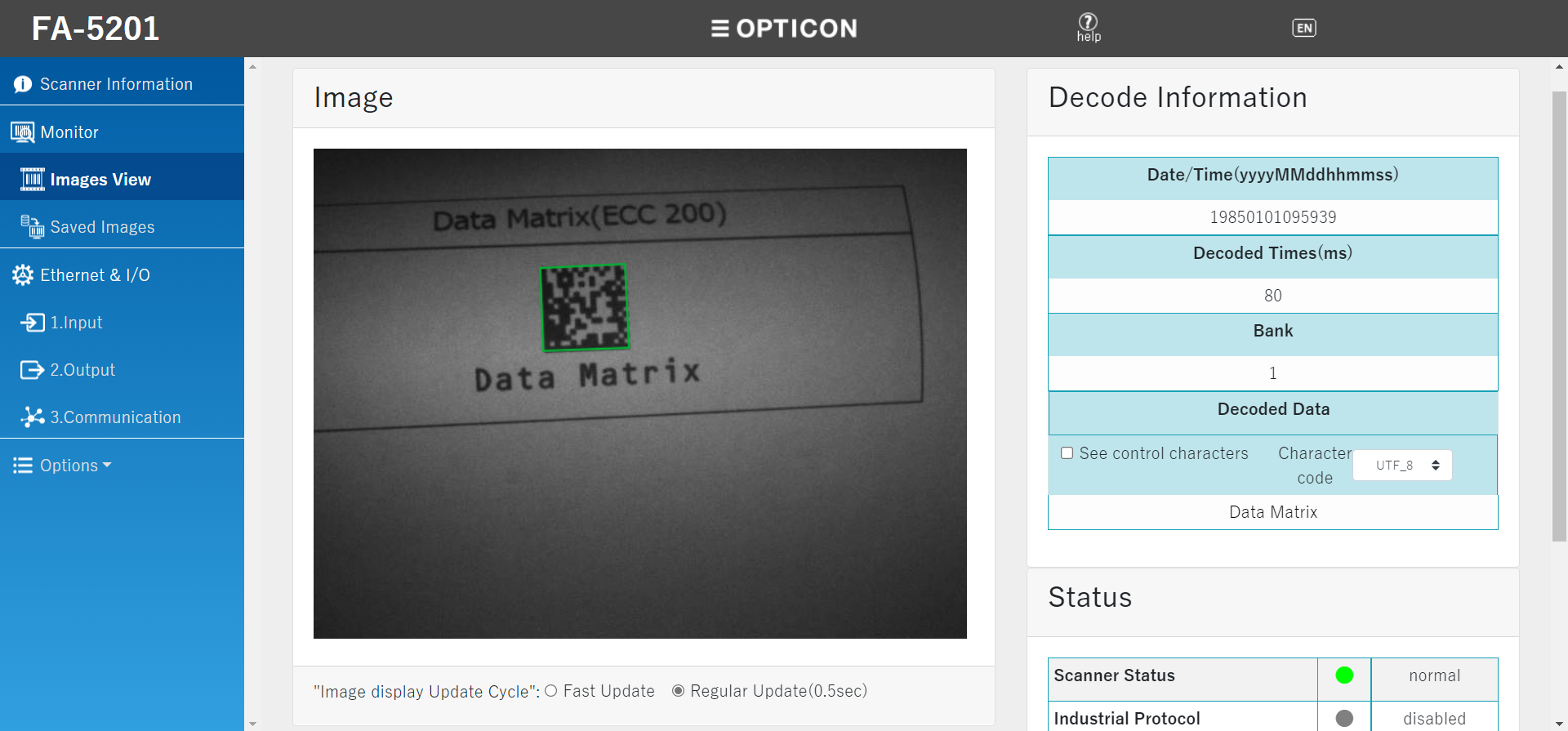
You can view information on the latest scanned image.
Load time might be affected if the load is concentrated on the network or Web server.
Set the image quality is in 2. Output, Image save setting (common).
Increasing the image quality will increase the processing time and may increase the reading interval. To use in an operation that requires high-speed reading, reduce the image quality and evaluate it before using.
How to use
When the scanner scans, the scanned image will be displayed.
Image display update cycle
Select the cycle for updating the image display.
| Fast Update | The scanner request the next image update when the image display is complete. (Fast Updates may overload the scanner and network,
and might affect the operation of the scanner and image view.) |
|---|---|
| Regular Update (0.5 seconds) |
Update the request for the next image every 0.5 seconds. |
Decode Information
| Date/Time | (year in 4 digits) + (month in 2 digits) + (day in 2 digits) + (hour in 2 digits) + (minute in 2 digits) + (second in 2 digits) |
|---|---|
| Decoded time | Time required to decode. The unit is ms. |
| Bank | The bank where the image was scanned. |
| Decoded data | The scanned data. When "see control characters" are checked, the line break control character will be displayed without a line break. If garbled characters occur in the decoded data, set the character code from "Character code" according to the character code of the read data. |
Status
You can check the connection status and operation status of the scanner.
| Target to display the status | Status name | Status |
|---|---|---|
| Scanner status | normal | The scanner is operating normally. |
| warning | The temperature of the scanner is high. There is a possibility of reading performance degrade. Consider cooling the scanner. | |
| overheat | The temperature of the scanner is very high. There is a risk of scanning stop, malfunction, or burns. Stop the operation and consider cooling the scanner. | |
| Not Available | Communication between the Web browser and scanner is interrupted and Failed to obtain the status. Please check the network. | |
| Industrial protocol | Connecting | The scanner is connected to the PLC normally. |
| disconnected | Connection to the PLC is not established. | |
| disabled | The setting does not allow communication via PLC Link. | |
| Not Available | Communication between the Web browser and scanner is interrupted and Failed to obtain the status. Please check the network. | |
| FTP | Connecting | The scanner is connected to the FTP server normally. |
| disconnected | The scanner failed to connect to the FTP server. | |
| normal | Normal connection to the FTP server is established. | |
| disabled | The setting does not allow communication with the FTP server. | |
| Not Available | Communication between the Web browser and scanner is interrupted and Failed to obtain the status. Please check the network. | |
| SNTP | Connecting | The scanner is connected to the SNTP server normally. |
| disconnected | The scanner failed to connect to the SNTP server. | |
| normal | Normal connection to the SNTP server is established. | |
| disabled | The setting does not allow communication with the SNTP server. | |
| Not Available | Communication between the Web browser and scanner is interrupted and Failed to obtain the status. Please check the network. |