Saved Images
Display the Saved Image
You can view the images stored in RAM.
The setting for RAM saving is at "Images save" tab in "2.Output".
There is a limit to how much the scanner saves in RAM.
Load time might be affected if the load is concentrated on the network or Web server.
How to use
Select the image to browse from the list on the left side.
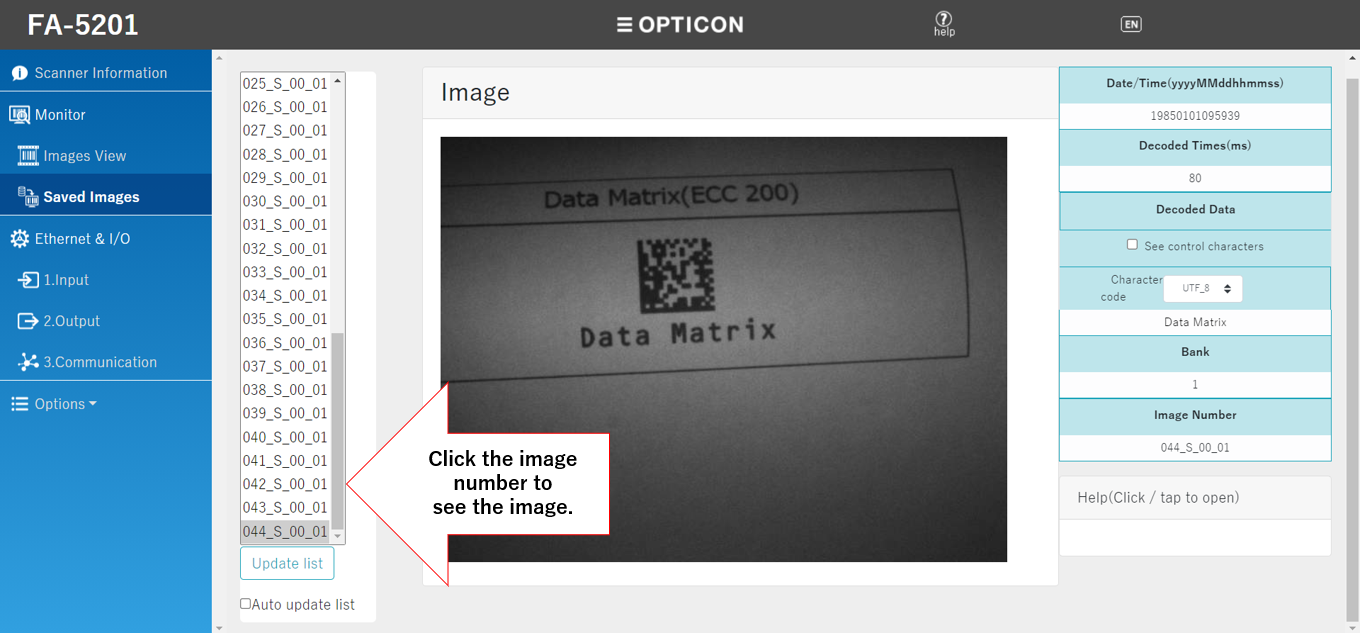
- Click "Update list" to update the images saved in RAM.
- Check "auto update list" to automatically display the latest images.
Decode Information
| Date/Time | (year in 4 digits) + (month in 2 digits) + (day in 2 digits) + (hour in 2 digits) + (minute in 2 digits) + (second in 2 digits) |
|---|---|
| Decoded time | Time required to decode. The unit is ms. |
| Bank | The bank where the image was scanned. |
| Decoded data | The scanned data. When "see control characters" are checked, the line break control character will be displayed without a line break. If garbled characters occur in the "Decoded data", set the character code from "Character code" according to the character code of the read data. |
| Image Number | The image number in the list on the left side. |
To save stored images in PC
Save the images with the function of the browser. For PC, right-click on the image and select "Save as".